A journal is for you. A track record is for everyone else.
Two products that start the same way and end differently
In TradeZella the trades land in a private workspace built for review: you tag them, you write against a playbook, you replay the ones that hurt, and an assistant looks for tilt. It is a coach's room, and it is a good one. Nobody outside sees it unless you invite them.
In ShowMyTrades the trades land in the same kind of journal (notes on every closed trade, a calendar that judges each day in colour, filters that recompute every statistic on any subset) and then keep going: into a public page with its own address, two verification badges, eighteen widgets you can paste anywhere, and a place in a search of two thousand real accounts. Or they stay private. That is the default, and you can leave it there forever.
If you will never show anyone your results, TradeZella's replay and backtesting are worth paying for. If you will (to a prop firm, an investor, a buyer, a group that wants proof), the page is the product. And a page has to be verified, which a journal cannot be, because a journal is edited by the person who wrote it.
The comparison, without the sales pitch
| What you are comparing | ShowMyTrades | TradeZella |
|---|---|---|
| Price | Free, no trial, no card | From $35 a month, no free plan |
| How trades get in | From the account, automatically. Nothing typed, nothing uploaded | Broker sync, CSV upload or manual entry |
| MT4 and MT5 | Yes: Expert Advisor in real time, or investor password | Yes: investor password, synced every 3 hours, or HTML upload |
| cTrader | Yes, OAuth | Yes |
| TradeLocker | Yes | Yes |
| Stocks, options and futures at US brokers | No | Yes: 500+ brokers |
| Notes on trades | Yes: 1,000 characters, public or private | Yes: rich journal with templates |
| Naming your strategies | Labels on magic numbers, used by every chart and search | Playbooks with rule tracking |
| Daily P&L calendar | Yes | Yes |
| Automatic reading of your statistics | Yes: Insights | Yes: Zella AI, with tilt detection |
| Backtesting and tick-by-tick replay | No | Yes |
| Verified public track record page | Yes: free, two verification badges | No: sharing is private, with mentors and groups |
| Embeddable widgets | 18, free, they update themselves | No |
| Alerts: drawdown, daily loss, consecutive losses | Yes | Yes |
| Alerts: account offline, EA stopped, news vs your open positions | Yes: on the site, by email or on Telegram | No |
| Prop firm rules | Prop Shield, free | Prop Firm Sync |
| Search real public accounts | Explore: 2,200 accounts | No |
Read the backtesting row and the US brokers row again: if those are the reason you pay, pay. Prices and features on the TradeZella side are as published on their site in September 2026.
The journal that fills itself
Notes where the trade is
Up to 1,000 characters on any closed trade, written from the trade table or from a day in the calendar. The note stays with the trade forever, and you decide whether visitors can read it.
Strategies with a name
Label a magic number once and every chart, table, filter and search uses that name instead of the number. Several robots on one account stop looking like one robot. How labels work.
Every day, judged in colour
Result, trade count and win rate in every cell, weekly totals down the side. Click a day and its trades open up, notes included.
Recalculate on any subset
Filter by date, symbol, magic number, direction, weekday, trading hour, lot size or profit range, and every statistic recomputes. Save the filter as a preset and it applies itself next time. Insights then read the result and say, in plain English, what is working and what is not.
Why a journal cannot be a track record
A journal is a private document, and privacy is its point: you can be honest in it precisely because nobody is checking. That same property makes it useless as evidence. A screenshot of a journal proves that someone typed a journal. A CSV export proves that someone exported a CSV.
A track record is the opposite kind of document. It is read by strangers, and it is only worth reading if they can see that the numbers came from the broker through a connection that cannot write, and that the person publishing it controls the account. On ShowMyTrades those are two separate badges, Track Record Verified and Trading Privileges Verified, and both sit in the page header where a reviewer looks first.
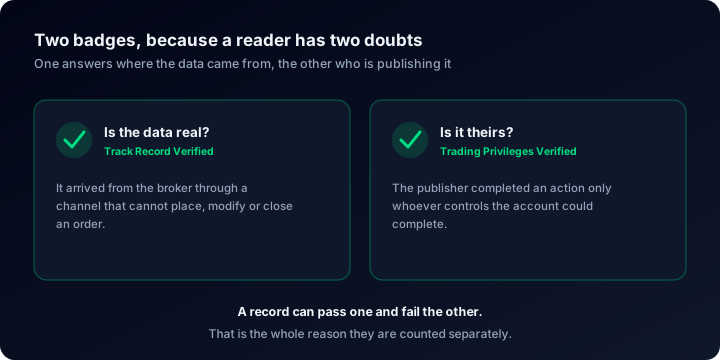
The page also shows what a serious reader checks before anything else: the deepest drawdown and how long recovery took, the monthly table with its red cells intact, commissions and swap paid, and how long the history really is. Across the public accounts here with trading history, the median deepest drawdown is 9.7%, and 38.2% have been more than 20% down at some point (August 2026). If you want the mechanics of the badges, what third-party verification actually proves goes through what each one does and does not establish, and how long a track record needs to be answers the question that decides most reviews.
What TradeZella does that we don't
- Backtesting against years of tick data, with win rate, profit factor and max drawdown on the result.
- Trade replay, tick by tick, with drawing tools and variable speed.
- Playbooks that hold your rules and tell you whether you followed them, trade by trade.
- An AI coach trained on their journal data, watching for tilt and repeated behaviour.
- Spaces to share a journal privately with a mentor or a trading group.
- Stocks, options and futures at US brokers such as Interactive Brokers, TradeStation and NinjaTrader.
None of that is on our roadmap as a paid add-on, because none of it is what this site is for. We publish track records and the tools to read them; the journal is here because a track record without the why is only half a document.
What we do that a journal doesn't
A public page, on your terms
Private, published, or unlisted (reachable by link but absent from search and from Explore). Lot sizes, comments and stop levels can each be hidden separately, and the address is a slug you choose.
Eighteen widgets that update themselves
Equity curve, stats card, monthly returns, full dashboard: as an iframe, a PNG or an SVG, with snippets for HTML, Markdown and BBCode. See the widgets.
Alerts about the account, not only the trades
Drawdown, daily loss and consecutive losses, like a journal. Plus the account going offline, the EA going quiet, autotrading switched off, and high-impact news checked against the positions you actually hold. On the site, by email or on Telegram, once per episode.
Prop Shield
Type in your challenge rules once and the account page counts them for you: profit target, static or trailing drawdown, daily loss on your firm's reset hour, consistency, trading days. How Prop Shield works.
Running both takes about five minutes
- Connect the account. Expert Advisor or investor password for MetaTrader, OAuth for cTrader, broker credentials for TradeLocker.
- Let the history load. Closed trades, balance and equity arrive on their own; nothing is uploaded and nothing is typed in.
- Add the why. Notes on the trades that deserve one, names on your magic numbers, a saved filter for the setups you care about.
- Decide who sees it. Keep it private, publish it, or leave it unlisted. Take the link, or a widget for your own site.
Your TradeZella journal can stay exactly where it is. Both connections are read-only and neither interferes with the other.
Questions people actually ask
Keep the journal. Add the proof.
Free forever, verified from the broker, private until you decide otherwise. Connect an account and see what your journal looks like once it can leave the room.