Magic Numbers: How to Separate Your Strategies Inside One Account 2026

🎯 The Question a Total Cannot Answer
You run three Expert Advisors on one MT5 account. Say the year closes at +18%. Which one earned it?
The equity curve will not tell you. Neither will profit factor, drawdown or win rate, because every one of them is computed on the merged stream of trades. Three strategies, one balance, one line. A grid EA quietly bleeding $200 a week disappears inside a trend follower having a good quarter, until the quarter ends.
One field in MetaTrader survives that merge: the magic number. It is not an analytics feature we invented, it is an integer your EA stamps on every order it sends, and the terminal keeps it for the life of the trade. Set properly, your history is already split. Not set, and no amount of analysis will split it later.
🔢 What a Magic Number Actually Is
A magic number is an integer written by the code that sends the order: a parameter of the order-sending call in MT4, a field on the trade request in MT5, carried onto the resulting position and deal. The broker does not assign it, the platform does not validate it, and nothing checks that it is unique.
Three consequences follow.
Trades you place by hand carry zero. That is why a manual bucket exists on every breakdown, and why it is the one row you cannot rename.
An EA left on its default is invisible. Plenty of EAs ship with the magic input set to 0. Those trades land in the same bucket as your manual clicks and stay indistinguishable from them forever.
The number is written once, at order time. You cannot back-fill it. A year of history sent with magic 0 stays one undifferentiated blob whatever you do afterwards, the most expensive mistake here, and only fixable going forward.
Other platforms carry the same idea in a different field:
| Platform | What carries the strategy tag | Placed by hand |
|---|---|---|
| MT4 | Magic number on each order, set by the EA | 0 |
| MT5 | Magic number on the request, position and deal | 0 |
| cTrader | The label a cBot writes (no magic number field exists) | No label |
| TradeLocker | The numeric strategy id on the order, read as a magic number | No strategy id |
In practice the per-strategy breakdown is an MT4 and MT5 feature: on a cTrader account the magic field arrives empty, every trade lands in the Manual row and the table collapses to one line. That covers almost everyone here: the overwhelming majority of the 10,000+ accounts connected to ShowMyTrades are MT4 and MT5, with cTrader and TradeLocker making up the rest (August 2026).
🏷️ Turning 55566 Into "Grid EURUSD"
A raw magic number is exact and unreadable. Nobody, including you in six months, remembers that 55566 was the range system on EURUSD.
On ShowMyTrades you rename it in place. In your dashboard, scroll to the Breakdown Statistics module (listed as Currency Pair Statistics in your account settings), and switch to the By Magic Number tab, which appears as soon as the account has closed trades to break down. Click the EA / Strategy cell of any row, type a label, press Enter.
Labels are capped at 50 characters and stored on the account, so they show on your dashboard, on your public page and in the Custom Analysis filter. Portfolios keep their own separate set.
Two behaviours matter before you start naming things:
- The same label merges rows. Give two magic numbers the same name and they collapse into one line, with trades, profit and won/lost counts summed and percentages recomputed. That is how you handle an EA running one magic per symbol: label them all "Breakout Basket" and read the basket as one strategy.
- The ungroup button splits them back. Merged rows get a control that restores them as "Name", "Name 2", "Name 3". Merging is never a one-way door.
The row for magic 0 is labelled Manual and is deliberately not editable. It is not a strategy, it is everything that arrived without a tag.
The table itself is six columns: EA / strategy, magic number (several numbers, if the row is merged), trades, profit, won and lost with percentages. Two details change how you read it.
Profit is net. Each trade enters the row as profit plus commission plus swap. A high-frequency magic number that looks fine on gross P&L can sit in the red here, and the red is the honest figure. Accounts published on ShowMyTrades have paid $4,782,670 in commissions and $862,547 in swap. Costs land on some strategies far harder than others, and this is the column where that shows.
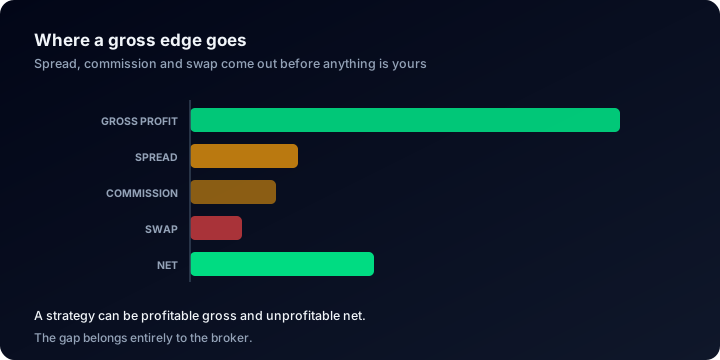
The By Magic Number table reports the last bar, never the first, which is how a busy strategy looks healthy on gross P&L and still sits in the red.
Deposits and withdrawals never enter. Only buys and sells reach the breakdown, so funding cannot inflate a row.
Rows are sorted by trade count, descending: convenient, not meaningful. The busiest strategy is very often not the one paying for the account.
Visitors see your labels: the public page prints "Grid EURUSD" in the EA / Strategy column, with 55566 in the column beside it. To keep the module off the page altogether, switch Currency Pair Statistics off in your account settings, like every section described in how to read a trading account dashboard.
🕵️ Finding the Strategy That Carries the Account
Read the profit column top to bottom first, then run three checks.
1. Concentration. If one magic number produced most of the net profit, your record documents that strategy plus some noise. The other rows are not diversification, they are decoration. This matters most when someone else is evaluating you, which is the exercise in how to verify trading performance claims.
2. The negative row inside a positive total. A losing strategy does not announce itself. It just makes the good one look slightly worse.
3. Win rate against profit. A high win rate on a negative row is the fingerprint of a system that closes winners early and holds losers. Across the public ShowMyTrades accounts with trading history the median win rate is 68.8%: ordinary, not evidence.
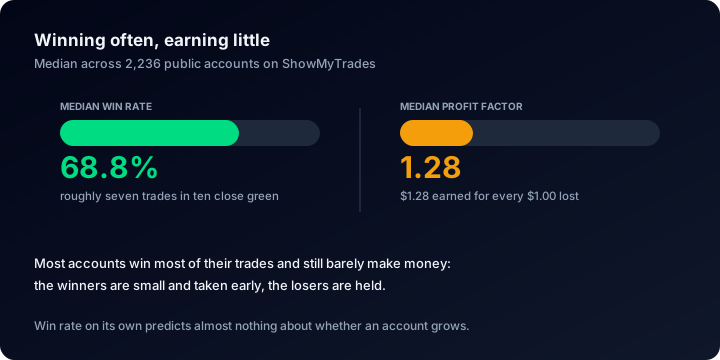
Seven trades in ten closing green is the population norm, so a win rate only becomes information once you read the profit column beside it.
Here is the arithmetic, on round numbers chosen to show the mechanism, not taken from any real account:
| Label | Magic | Trades | Net profit | Won |
|---|---|---|---|---|
| Range EURUSD | 11001 | 620 | +$8,400 | 74% |
| Breakout GBP | 11002 | 180 | +$1,900 | 41% |
| Grid Gold | 11003 | 940 | −$3,100 | 89% |
| Manual | 0 | 24 | +$300 | 50% |
| Total | 1,764 | +$7,500 |
The account is up $7,500 and every headline metric is green. But the busiest row, the one with the best win rate on the page, is the only one losing money. Its 940 trades alone are more than five times the 171-closed-trade median of public accounts on ShowMyTrades: it dominates the trade list, drags the win rate up, sets the average trade length, and subtracts from the result.
Switch it off and the account makes $10,600 instead of $7,500. No total and no chart will show you that. Only the split will.
Before adding size to the row that looks best, price the risk of the whole book, not of one strategy: the position size and drawdown calculators do it in a minute, and the forex calculators guide covers what they assume.
🤖 How Automated Real Accounts Are
The same field decides whether a trade counts as automated at all: a trade is automated when it carries a non-zero magic number, or a strategy label on the platforms that use one instead.
Measured across public accounts on ShowMyTrades in August 2026:
| Automation level | Share of accounts |
|---|---|
| Over 90% automated | 53.9% |
| Under 10% automated | 42.2% |
| Median autotrading share | 99% |
That is not a bell curve, it is two poles: accounts published here are either almost entirely run by software or almost entirely run by hand, with very little in between. It describes accounts on our platform, not traders in general.
It also carries a warning: because the measurement depends on the field, an EA that leaves its magic at 0 reports as manual trading. If your account shows 0% autotrading and you know a robot is trading it, that is the explanation: set a magic number in the EA inputs and restart it.
🔍 Filtering the Whole Page to One Strategy
The breakdown tells you which magic numbers exist and what each produced. For a full statistical page on one of them, open Custom Analysis.
Magic numbers appear there as chips: "Grid EURUSD - 55566" once you have labelled the number, the bare number if you have not, and "Manual (0)" for the untagged bucket. Pick one or several, press Analyze, and the whole page recalculates on that subset alone: KPIs, equity and TWR charts, monthly returns, advanced statistics, the trade list. Combine a magic number with a range of server hours and you find out whether a strategy is only profitable during one session.
Two things worth knowing. Visitors get the same panel on your public page, so anyone can isolate a strategy without asking you: deliberate, because a record you can slice beats one taken on faith, the argument in verified vs unverified track records. And if you set one of your saved presets to auto-apply for visitors, the page carries a banner naming it ("Analysis preset applied by owner"), which any visitor can clear. A filtered public view is never a silent one.
In the trade list, open the column menu and enable Magic Number to see the tag on each row. Next to it sits the Comment column, often carrying the EA's own annotations, unless the owner has hidden comments in the privacy settings.
🚧 What We Deliberately Do Not Do
We never guess which commercial EA is behind a magic number, and we never will. There are no robot pages on ShowMyTrades, no per-EA leaderboards, no aggregate claiming that a magic number belongs to product X. Your labels describe your account and stay on your account: not pooled, not propagated, not cross-referenced against anyone else's.
The reason is technical before it is ethical. The same EA runs with a different magic on every account that installs it. Different EAs collide on the same round numbers constantly: 12345 belongs to nobody. Labels are free text written by owners with different conventions. Any conclusion drawn from that soup would be a guess dressed as a fact, and a track record platform that publishes guesses has stopped being one.
A magic number is a tag the account owner controls, not an identifier of software. We keep those two things separate.
⚠️ Five Ways This Goes Wrong
- Leaving everything at the default. Two EAs both shipping with magic 0 are one EA as far as the data is concerned, permanently. Assign numbers before you need them, not after.
- Choosing the granularity too late. Decide up front: one magic per EA is simplest, one per EA and symbol is what you want if you plan to retire individual pairs. Labels can merge rows afterwards, but nothing can split what the terminal recorded as one.
- Reading row order as importance. The table sorts by trade count. The row that matters is the one with the largest absolute profit, in either direction.
- Judging a strategy on its win rate. Pair it with the profit column, always. A 90% win rate on a negative row is a system working exactly as designed and losing money anyway.
- Comparing profit in currency across accounts. $8,000 made on a $200,000 account is not the same strategy as $8,000 made on $5,000. Inside one account currency is fine; across accounts use percentages, for the reasons set out in tracking your trading performance.
❓ FAQ
Can I assign magic numbers retroactively? No. The number is written by the EA when the order is sent and stored with the trade, so old trades keep whatever they were given, including zero. Set them now and everything from today forward is separable.
What number should I choose? Any integer that is unique on that account. A convention that works: a fixed prefix per strategy plus a suffix per symbol, for example 11001, 11002 and 11003 for one system across three pairs. Write the list down: the labels on your account page are a good place.
Do my labels show on the public page? Yes, on the By Magic Number tab, next to the number. If you do not want that published, switch off the Currency Pair Statistics section in your account settings; the rest of the page is unaffected.
Why does my automated account report manual trades? Some trades arrived with magic 0: an EA with its magic input left at the default, positions opened or closed by hand, or trades copied from a source that does not tag its orders.
Does any of this work on cTrader or TradeLocker? cTrader has no magic number field at all: we read the cBot label to detect automation, but the per-strategy breakdown is MT4 and MT5 territory, and cTrader trades all sit in the Manual row. TradeLocker orders carry a strategy id, and a numeric one is read as a magic number, so those orders do split.
Can I share labels between two accounts? No. Labels are stored per account, and portfolios keep their own set. The same EA on two accounts needs naming twice: correct, since the two installations can legitimately use different numbers.
🔗 Related Guides
- How to read a trading account dashboard: every module and metric on a public account page
- The complete guide to tracking your trading performance: which numbers to watch over time
- How to verify trading performance claims: the checklist before you trust anyone's record
- How to verify your trading account: get your own data confirmed by the broker
See it on real accounts. Public pages on Explore are broker-synced, and plenty run several strategies on one balance, the split visible to anyone who opens the tab.
Connect your account free, label your magic numbers once, and stop guessing which strategy pays for the others.
What Third-Party Verification Actually Proves (And What It Does Not) {YEAR}
Two badges answer two different questions: is the data real, and does the publisher own the account. Here is what each proves, and the four things neither can.
Cent Accounts: Why the Numbers Look Enormous and What They Really Mean {YEAR}
A cent account shows 10,000 when the trader deposited $100. How the denomination works, why lot sizes scale with it, and which metrics it cannot distort.