Share your backtest. As a page, not a file.
Upload the Strategy Tester report from MT4, MT5 or cTrader. You get a page with a link — equity curve, statistics, every trade — labelled BACKTEST so nobody can mistake it for real money, and refused if the numbers don't add up.
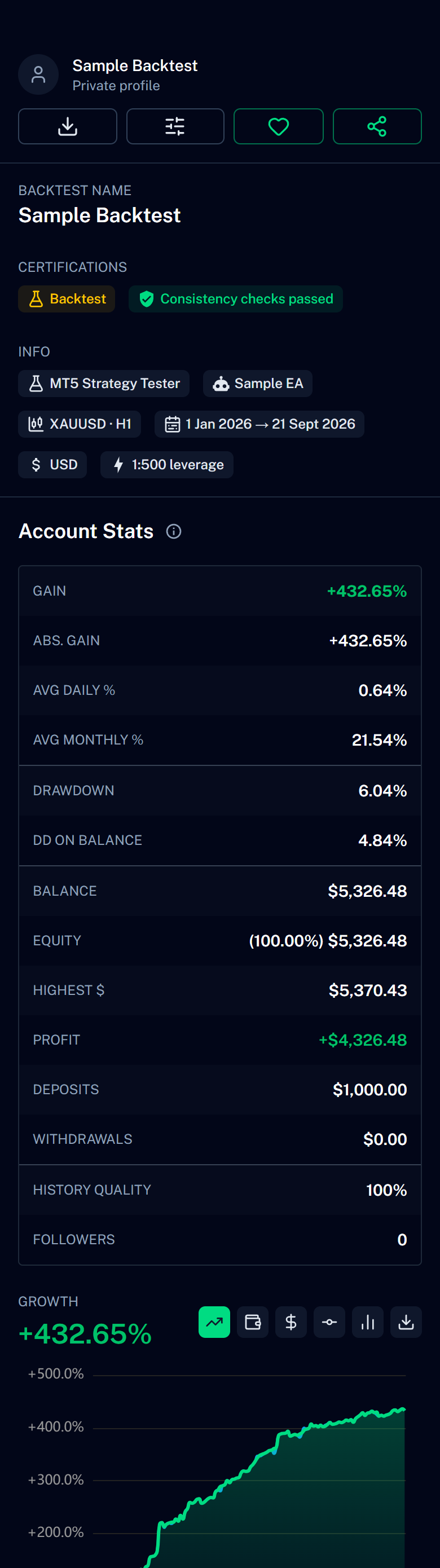
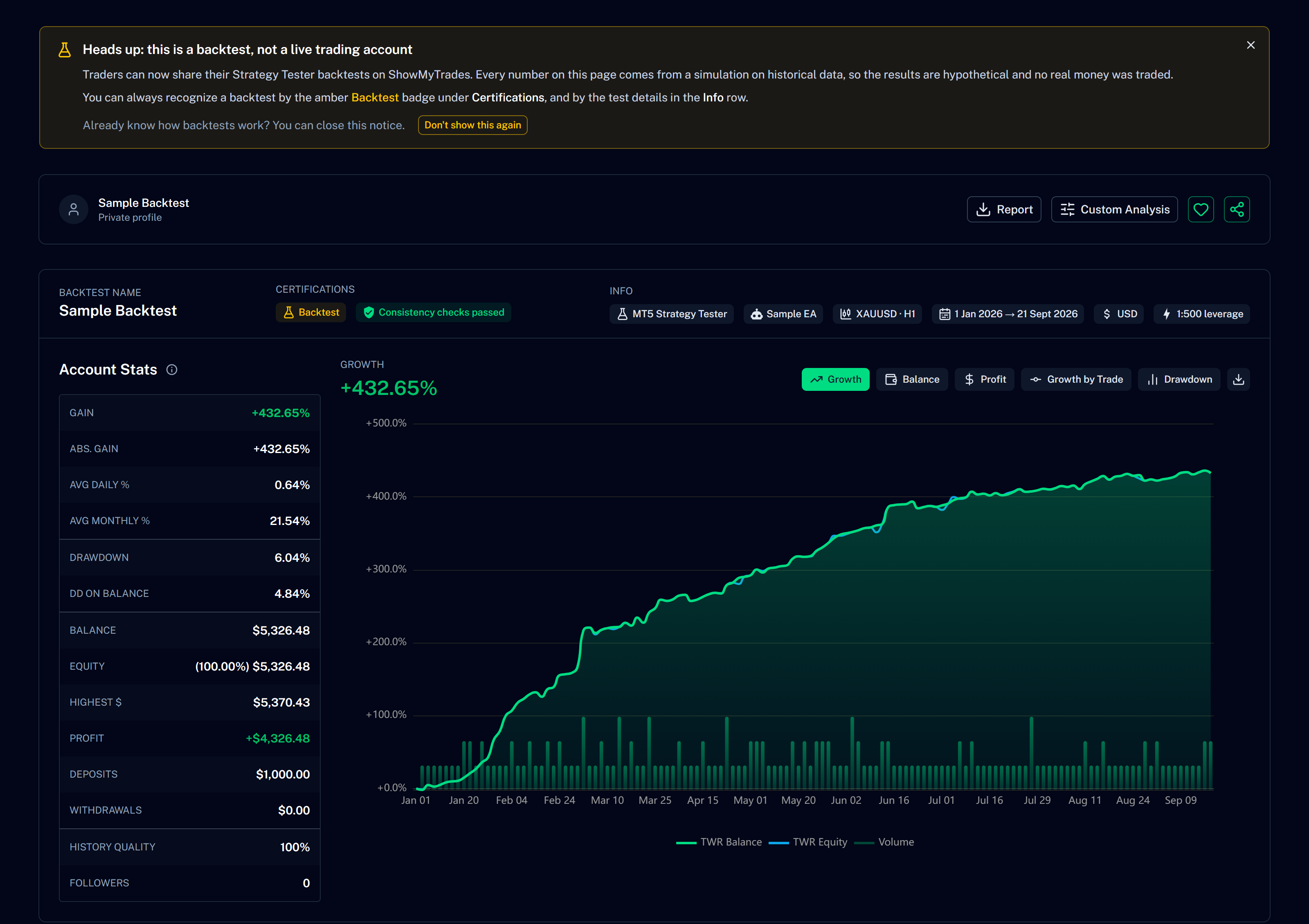
A real MT5 backtest as it appears on its public page. Name masked.
A screenshot of a backtest proves a screenshot. A page with every trade proves the test.
The Strategy Tester already wrote the whole story — every trade, every figure. All that was missing was a place to read it.
From a file nobody opens to a link anyone can read.
A report nobody can open
MT5 saves the report as an HTML file plus loose images; MT4 as a .htm; cTrader as a report of its own. Attach it to a message and the receiver gets a wall of tables — if the images even arrive. Here it becomes one page, one link.
A page with every trade in it
Equity curve, drawdown, monthly table, every trade, Custom Analysis, magic numbers — the full statistics, not a screenshot of the summary. With an amber BACKTEST badge on top, so nobody mistakes it for real money.
Refused if the numbers don't add up
Every declared figure in the summary is checked against the trade table and against the other figures — profit factor, expected payoff, recovery factor, drawdown, counts, streaks. A report that has been edited by hand is rejected at upload, and you are told which number did not match.
Save the report. Upload it. Share the link.
Save the report from your platform
MT4: right-click the Strategy Tester results, Save as Report. MT5: Save as Report, and keep the images it writes next to the HTML file. cTrader: export the backtest report from cTrader Algo. Any terminal language works.
Upload it
Drop the file — and the MT5 images with it — on the upload page. The trades are read one by one, the summary is rebuilt and compared with what the tester declared. A test of twenty years takes about two minutes.
Publish it, or don't
Private by default. Publish it and it gets its own address, appears in the Backtests tab of your public profile, can be followed, and hands visitors the original report as a download. Unlisted is available too: by link only.
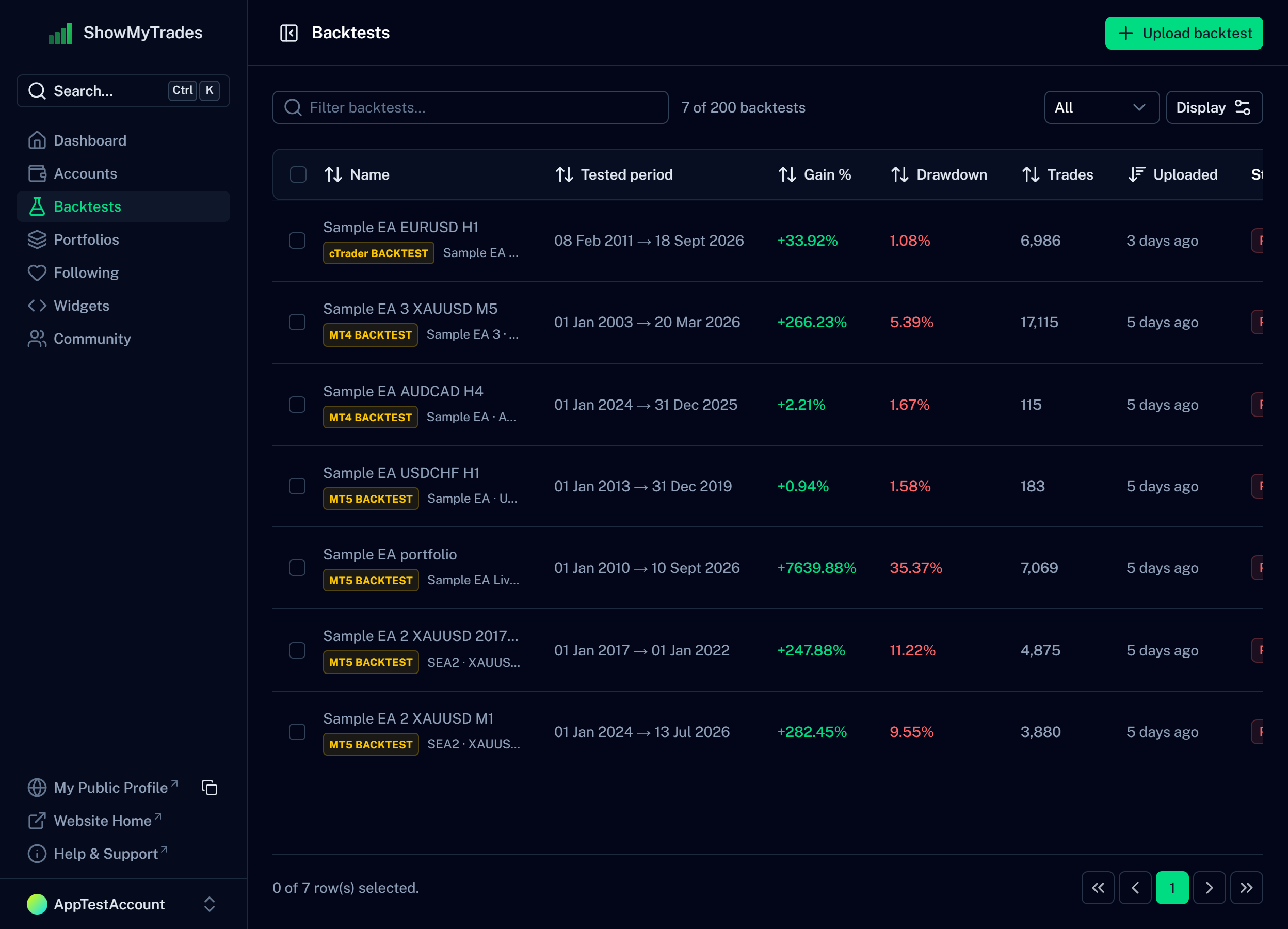
The Backtests section of the dashboard — MT4, MT5 and cTrader reports side by side.
The full statistics. And the word BACKTEST on every corner.
Colours, visible sections, privacy of lots and prices: all yours to set. Nothing is cut down because it is a test — and nothing lets it pass for a live account.
The curve, frozen where the test ended
Growth, balance, profit and drawdown charts from the test's first trade to its last. Nothing is extrapolated past the end date.
The tester's own figures
Where the page shows a number the tester also declared — the drawdown, above all — it shows the tester's figure, not ours. The drawdown is the worst the tester saw, on equity or on balance, whichever is deeper.
Every trade, with notes
The full trade list with symbol, lots, prices, commission and swap, and the same private notes you can write on a live account. Magic number 0 is the Expert Advisor that ran the test, never "Manual".
The calendar and the monthly table
Every day of the test judged in colour, and the month-by-month returns with the same maths as a live account.
Custom Analysis
Filter the test by symbol, weekday, hour, magic number or date range and watch the statistics recompute — useful for a portfolio test that mixes several symbols.
The original report, downloadable
Visitors can download the exact file you uploaded, images included, as a ZIP. What they see on the page and what they hold in their hands is the same test.
An edited report is a report we don't take.
A Strategy Tester report is a text file, and text files can be edited. Someone who softens the drawdown usually forgets a figure that depends on it. Every declared number in the summary is recomputed from the trade table and checked against the others; if one does not match, the upload stops and says which.
The tolerances come from thousands of genuine reports, so a real test is never turned away — and a touched one has to get every linked figure right to pass.
Passing means the report is consistent with itself. It does not mean the strategy is good, or that the same result would happen live.
- Net profit against the sum of every trade in the table
- Gross profit and gross loss recomputed from the trades
- Profit factor, expected payoff and recovery factor against the figures they are built from
- Total trades, winners and losers, long and short counts
- Largest and average winning and losing trades
- Longest winning and losing streaks
- Balance drawdown — money and percent must agree
- Equity drawdown pairs, and the balance curve rebuilt trade by trade
- Initial deposit, currency and period against the trade dates
What a backtest page is not.
It is not a live account, and it never looks like one
The word BACKTEST is on the page, in the title, on the badge, in the social preview and in the API. A live account earns certifications here; a backtest never does.
It is not verified
A backtest is a simulation on historical data. We check that the report is internally consistent — that the figures it declares match the trades it lists — and say so with "Consistency checks passed". That is not a certificate that the strategy works.
We do not run backtests
There is no backtesting engine here. You run the test in MetaTrader or cTrader, as you already do; we turn the report into a page you can show.
It stays out of the ranks
Backtests do not appear on Explore, cannot join a portfolio and are not counted among your live accounts. They live in their own tab on your profile.
Questions people actually ask
Stop attaching the file.
Upload the report once and send a link. It costs nothing, it is private until you say otherwise, and it says BACKTEST on every corner.