Your balance tells you where you ended up, not how you got there
What tracking actually means
A trading account already contains a perfect record of your behaviour. Every position carries its open and close time, its size, its symbol, the commission charged and the swap paid overnight. The problem is that the platform hands you this as a list, ordered by time, with a running balance at the bottom. Two thousand rows is data, but it is not information: nothing in it tells you that your Tuesday trades are paying for your Thursday ones, or that a third of your gross profit goes back to the broker in costs.
Tracking is the step in between. It means collecting that history continuously and reshaping it into the handful of measures that describe a strategy rather than a day: an equity curve, maximum drawdown , profit factor, expectancy per trade, cost as a share of gross profit, and a return measure that is not distorted by your own deposits and withdrawals. That last one catches almost everybody: a balance that doubled after you wired in fresh capital has not doubled at all, which is the reason time-weighted return exists.
Done properly it answers three separate questions. Am I making money, and how much of that is skill rather than account size? What did the return cost, measured at the worst moment rather than at the end? And could somebody else check any of it without taking my word for it? Most methods answer the first question. Some answer the second. Very few answer the third, and the third is the one that decides whether your record is worth anything to anyone but you.
Two names come up whenever this subject does, and it is worth saying early where they are ahead of us. Myfxbook and FX Blue have both been reading MetaTrader accounts through the investor password for years, and both give you a free public profile. Myfxbook carries a community with active forums that we have never had; FX Blue is a long-established tool with a deep feature set. If the community around the numbers is what you are after, this page will not change your mind and is not trying to: what follows is about the record itself.
Four ways people track an account
| What you need it to do | Broker statement | Spreadsheet | Screenshot | Connected tracker |
|---|---|---|---|---|
| Where the numbers come from | The broker, directly | Typed in by you | Whatever was on screen | The broker, read-only |
| Effort to keep it current | Export it again every time | Every trade, by hand | One click, then it is stale | None after setup |
| Covers the months you would rather skip | Only if you send all of them | Only what you chose to enter | Almost never | The whole account, continuously |
| Equity curve and drawdown over time | A closing figure, not a curve | If you build it yourself | A single frame | Rebuilt from every trade |
| Spread, commission and swap treated as a cost | Listed, not analysed | Only if you enter them | No | As a share of gross profit |
| Why you took the trade | No | Yes, and nothing else does it | No | Only what you label yourself |
| Several accounts and brokers in one view | One statement per account | If you build it yourself | No | Yes, on the paid Portfolio module |
| A reader can check it without trusting you | A file can be edited before sending | No | No | A live page fed by the broker |
| Evidence that the publisher owns the account | A name on a document | None | None | A separate verification step |
| Sharing it | An attachment | An attachment | An image | A link, or an embeddable widget |
| Accepted as the formal document | Yes, it is the source record | No | No | No, it reads the same account |
Two rows deserve more than a tick. The spreadsheet wins on intent, and it always will: no feed coming out of a broker can record that you took a trade because you were bored, or that you moved a stop because you had to leave the desk. If you are working on your own discipline, keep the journal. A tracker sits underneath it and takes over the arithmetic you should not be doing by hand in the first place.
And the statement is still the source record. A tracker does not replace the document your broker or prop firm issues; it reads the same account continuously, so that document is not the only thing standing between a claim and a reader. As for screenshots sitting at the bottom of every column: the problem is not dishonesty, it is selection. An image shows one moment that somebody chose, and the choosing is the whole issue. If you buy strategies from other people, how fake EA results are made walks through exactly how far that goes.
What a read-only connection can and cannot see
What it sees
Every closed position with its open and close time, price, volume, symbol, commission and swap. Balance and equity through time, deposits and withdrawals, open positions, the broker server the account lives on, and whether the account is real or demo, pulled from the broker rather than declared by the owner.
What it cannot see
Your reasoning, your plan, the trades you nearly took, and any capital sitting outside the account. It also cannot see a second account elsewhere running the opposite side of the same strategy, which is why one clean page is evidence about one account and nothing more.
What it cannot do
Trade. On MT4 and MT5 the investor password reads everything and cannot place, modify or close an order. cTrader connects through OAuth, so no password changes hands and you revoke access from cTrader itself. TradeLocker uses the login your broker or prop firm issued, held encrypted on our servers.
What only you see
For your own MetaTrader accounts we report the state of the terminal itself: ping to the trade server, packet retransmission, build, memory, whether auto trading is allowed, whether DLL imports are enabled. None of it appears on a public page. It is diagnostics for the owner, because a strategy and a strategy running on a 220 ms link are not the same strategy.
What tracked accounts actually look like
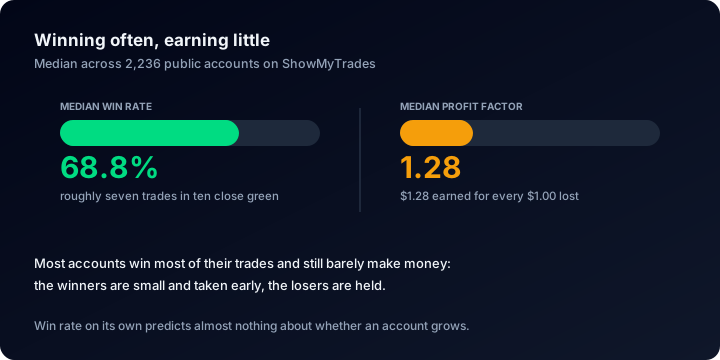
Take the two most quoted numbers in retail forex and put them next to each other. Across the accounts published here the median win rate is 68.8%, roughly seven trades in ten closing green, while the median profit factor is 1.28 net of costs. Those two facts only fit together one way: the losing trades are much larger than the winning ones. An account that wins seven times out of ten and still returns only 1.28 for every 1.00 it loses is cutting winners and holding losers, and it is one bad week away from handing the year back. This is the most useful thing tracking has told us, and no screenshot would ever have revealed it. If it stings, that is the point of why win rate is not an edge .
Drawdown tells the same story from the other end. The median account's deepest drawdown is 9.7%, which sounds mild until you look at the tail: 38.2% of accounts have been through a drawdown deeper than 20%, and 17.6% have been more than halved at some point in their life. Alongside that, the median time-weighted return is +3.2% and 63.0% of accounts are positive. Most accounts are quietly a little up, a large minority have survived something severe, and the average of the two describes nobody at all. Whenever a page shows you a return without the worst moment that produced it, half the record is missing.
One more figure worth holding onto: the median tracked account has 171 closed trades, with a median trade length of 2.4 hours. That is not much history to draw conclusions from, and it is roughly the amount most people draw them from anyway. How much history a track record needs puts numbers on how long each metric takes to settle, which is longer than you would like for every single one of them.
What to look for in a tracker
The credential it asks for
If a tracker asks for a password that can trade when a read-only one exists, ask why. Read-only should be enforced by the platform, not promised in a paragraph.
Whether it covers your platform
MT4 and MT5 are the common denominator. Neither Myfxbook nor FX Blue connects cTrader or TradeLocker; we connect all four, which matters if your broker or prop firm has moved off MetaTrader.
Two kinds of verification
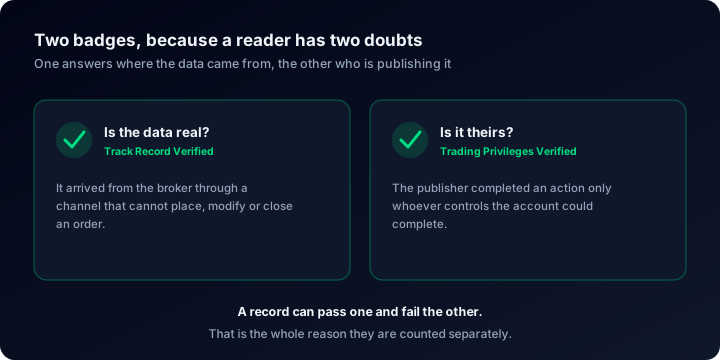
Track Record Verified means the data arrived from the broker through a channel that cannot write. Trading Privileges Verified means the publisher demonstrated control of the account itself. Different questions, different badges: what each one proves .
Costs, not just profits
Spread, commission and swap decide whether a marginal strategy is viable at all. A tracker that never shows cost as a percentage of gross profit is hiding your most actionable number.
Control over what is public
Private, published, or unlisted: link-only, out of search and out of Explore. Lot sizes, comments and stop levels hide separately, so you can prove a result without publishing the recipe.
What happens to your links
A custom slug can change once every 30 days and the old address redirects permanently, so a widget already embedded on somebody else's site keeps working after a rename.
Where a tracker is the wrong tool
To repeat the admission made at the top, because it belongs here too: there is no community and no forum here, and if being discussed is what you came for we are not the answer. Tracking is also no substitute for the broker's own statement when a firm asks you for a formal document, and it will not tell you whether a strategy makes sense, only what it did.
What it does give you is narrower and more durable: a record that keeps itself, computed the same way every month, that a stranger can open without having to believe you first. For the practical routine, read tracking trading performance ; to make sense of the panels once the data is in front of you, reading a trading account dashboard goes through them one at a time. For costs specifically, start with the broker cost audit , and for the sizing and risk arithmetic that comes before any of it, the calculators are free and need no account.
Questions people actually ask
Connect one account and see what it has been doing
MT4, MT5, cTrader or TradeLocker, read-only, with the history rebuilt as far back as the broker will serve it. Free, private until you decide otherwise, and no advertising anywhere on the site.