Your firm runs TradeLocker. Your record lives in their portal.
What TradeLocker is, and why it left traders invisible
TradeLocker is a white-label trading platform. Brokers and prop firms license it, put their own name and colours on it, and hand it to their clients as the place where the trading happens. It runs in a browser and on a phone. There is no terminal to install on a Windows machine, no scripts folder, no investor password. For the firm it is a modern front end they did not have to build. For the trader it is frequently not a choice at all: the account is on TradeLocker because that is what the firm runs.
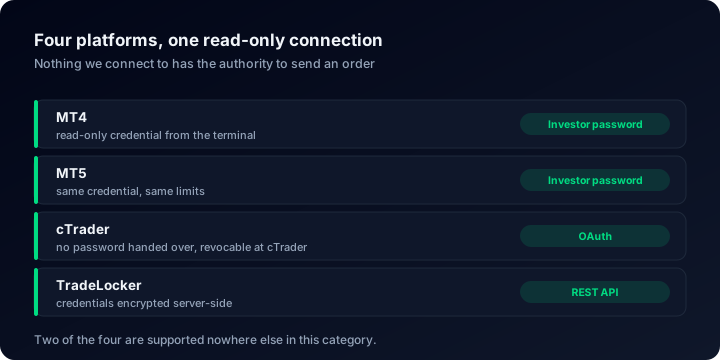
The problem shows up the moment that trader wants to prove anything. Performance tracking grew up around MetaTrader, and it grew up around two specific mechanisms: the read-only investor password, or a small program running inside the terminal and reporting what it sees. TradeLocker has neither of those. It exposes a REST API instead, which means the firm's servers answer questions over HTTPS and reading an account is a matter of authenticating and asking. It is perfectly good plumbing. It is simply different plumbing, and tools written for MetaTrader do not speak it.
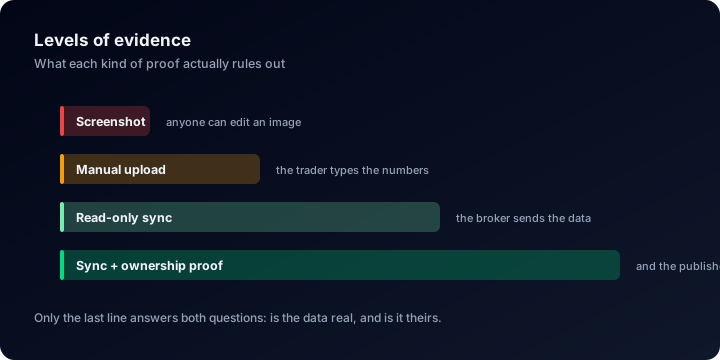
So a funded trader passes an evaluation, trades a real allocation for eight months, builds numbers worth showing, and then discovers that the only artefacts they own are screenshots and a dashboard inside the firm's portal, a dashboard that stops existing the day the account does. Screenshots are not evidence. Anyone who has read how faked results are usually spotted knows that an image proves nothing about who traded it, when, or on what.
None of that is a criticism of the alternatives, and it is worth saying so before the comparison rather than after it. Myfxbook has a community and forums we have nothing equivalent to, and FX Blue is a long-established tool with a deep feature set built up over years we have not been around for. If your account is on MetaTrader, both of them will read it. The single thing neither one does is read a TradeLocker account.
We built the TradeLocker integration directly on that REST API in July 2026. A TradeLocker account connects the way an MT4, MT5 or cTrader account connects, and it arrives on the same page, with the same charts and the same statistics, next to accounts from 703 broker servers.
The comparison, laid out plainly
| What you are comparing | ShowMyTrades | Myfxbook | FX Blue |
|---|---|---|---|
| TradeLocker accounts | Yes, through the REST API | No | No |
| Anything to install for TradeLocker | Nothing, no EA and no VPS | Not applicable | Not applicable |
| cTrader accounts | Yes, OAuth | No | No |
| MT4 and MT5 | Yes, investor password | Yes, investor password | Yes |
| Advertising around your statistics | None, on any plan | Banners, interstitials and sponsored broker links | Sponsor banners for brokers |
| Embeddable widget | Free, follows your site's theme | — | A white 2010-era block |
| Community and forums | No | Yes, large and established | — |
| Economic calendar | Yes, free | Yes | — |
| Depth of the surrounding toolset | Focused on the track record and reading it | Community and forums | Long established, deep feature set |
A dash means we have not checked that cell ourselves and would rather leave it empty than guess. Everything that is not a dash is something we have looked at directly.
Rows are only useful if you know what they cost you. The last four are the ones to read carefully. Myfxbook has a community and forums that we have never built; we have none of those and are not building them. FX Blue is a long-established tool with a feature set far wider than ours. If what you want is a place to discuss trades, follow other people's positions or check the calendar before the open, those products do that and this one does not.
What the first two rows say is narrower and, if you trade on TradeLocker, decisive: the account you actually trade cannot be read by the alternatives at all. A comparison you cannot enter is not a comparison.
New integration, established pipeline
TradeLocker is the newest platform here. The integration went live in July 2026, and TradeLocker traders have not had a reason to look for a tracking site because until now there was nothing to find.
What a TradeLocker account sits on is not new. It runs through the same pipeline that has synchronised 15,436,464 trades, the same statistics, the same public pages, the same widgets. You are early to a TradeLocker integration, not early to the product around it.
How the connection actually works
- You enter three things. The email address on the account, its password, and the server name your broker or prop firm gave you. Nothing else.
- We check demo and live. TradeLocker runs two separate environments and firms use both, so we authenticate against each one rather than asking you which you are on.
- Your active accounts come back. A single login often exposes several accounts, and every one that answers as active is added. Each arrives private, so you decide afterwards which of them, if any, becomes a public page.
- History loads on its own. Closed trades with their real profit, commission and swap, balance and equity. Nothing is typed in by hand and nothing can be edited afterwards.
The password is encrypted server-side with AES-256-CBC, with a fresh initialisation vector for each record, before it goes anywhere near storage. It is never returned to the browser. Here is the part that deserves saying out loud rather than burying: TradeLocker does not offer a read-only credential the way MetaTrader offers the investor password, so the credential we hold is the one you use. Against that, there is no order routing anywhere in this product: no code path that places, modifies or closes an order exists to be misused.
Nothing to install
No Expert Advisor, no terminal left running, no VPS paid for by the month. The data is read from the broker side over HTTPS, so your laptop can be closed and the page still updates.
Credentials stay server-side
AES-256-CBC encryption before storage, decrypted only on our server to talk to TradeLocker, never transmitted to the browser and never visible in any page you or anyone else loads.
Real costs, not estimates
Profit, commission and swap come from the closed-trade history the platform returns, so profit factor is net of what trading actually cost. The broker cost audit explains why that distinction changes the number.
Private until you decide
Three states: private, published, or unlisted (reachable by its link but absent from search and from Explore). Lot sizes, trade comments and stop levels can each be hidden on their own.
Who this changes something for
Funded traders
Your firm runs TradeLocker, your record lives inside its portal, and it ends when the allocation does. A page you own outlives the account it describes.
Clients of TradeLocker brokers
More brokers ship TradeLocker instead of a MetaTrader terminal every year. Their clients lose access to an entire category of tools by default, and gain it back here.
Traders on several platforms
A TradeLocker allocation, an MT5 personal account and a cTrader account read the same way, on one profile, instead of three pages that cannot be compared.
What the published page proves, and what it does not
Track Record Verified covers where the numbers came from: a channel with no authority to send an order. Trading Privileges Verified covers who is publishing them, established by an action only the account's controller could carry out. Prop firms tend to care about the second one most, because an evaluation result circulating under the wrong name is their problem too. Across the whole site 65 accounts carry the first badge and 264 the second, and whether an account is real or demo is pulled from the broker rather than declared by the owner. What each badge does and does not establish is set out in what third-party verification actually proves and in verified versus unverified track records .
The statistics themselves are the ones a reader who knows what they are doing will ask about: time-weighted return so deposits and withdrawals do not flatter the curve, deepest drawdown, profit factor net of costs, average trade length, monthly returns. If those terms are new, reading a trading account dashboard walks through a page one panel at a time, and there are separate guides on time-weighted return and maximum drawdown .
One caution worth repeating for anyone about to publish an evaluation account: two profitable months is not a track record. How much history a track record needs explains how little a short sample says, and why a high win rate is not an edge covers the statistic most likely to be misread by both sides. Connecting early is still worth doing: whatever closed history the platform still returns loads on connection and the record keeps growing from that day onwards, and the calculators are there in the meantime.
Questions people actually ask
Give your TradeLocker record a page of its own
Three fields, nothing to install, and a free public page with no advertising on it. Connect the account and see what your history looks like when it is not a screenshot.