Your cTrader record is complete, and nobody else can open it
The history is not the problem. Showing it is.
A cTrader account keeps a complete and unsentimental record of itself. Positions, volumes, commissions, swap, the exact second each order was filled: it is all there, and it was written by the broker rather than by you. That record is worth a great deal, right up to the moment somebody asks to see it, because it lives behind a login only you have.
So it leaves the platform as a screenshot, or as a statement pasted into a message. Both fail in the same direction: a reader cannot tell a genuine export from an edited one, which means a genuine export earns no more trust than a fabricated one. If you have ever wondered why a good month convinces nobody, that is the reason, and it is the same reason fabricated robot results keep working on people. The format carries no proof either way.
cTrader traders feel this more sharply than most. The two best-known track record sites both grew up around MetaTrader, and both do a great deal that we do not: Myfxbook has a community and forums we have never had, FX Blue a feature set built up over many years. Neither of them connects a cTrader account. The usual advice, connect it somewhere and send the link, has simply not been available.
ShowMyTrades connects cTrader directly, through the platform's own Open API, with no password handed over and nothing to install. The plumbing is finished and running in production, alongside the MT4, MT5 and TradeLocker connections that feed the same pages.
Inside the platform, and on a page anyone can read
| What you are comparing | In cTrader | On a tracked page |
|---|---|---|
| Who can open it | Whoever is signed in to the account | Anyone you send the link to |
| A permanent address for the record | Not what the platform is for | Custom slug, with a permanent redirect if you rename it |
| A widget for your own site | Not available | Free, and follows your site's theme |
| Proof the numbers were not typed in | You know; the reader has to trust you | Track Record Verified badge |
| Proof the publisher owns the account | Not a question the platform answers | Trading Privileges Verified badge |
| Real or demo | Obvious to you, invisible to the reader | Pulled from the broker and shown on the page |
| Several accounts as one curve | Account by account | Portfolio module, across brokers and platforms (paid) |
| What survives if you lose access to the account | Whatever you exported in time | The page, with the history already synchronised |
| Control over what a reader sees | All of it, or none of it | Private, published or unlisted; lot sizes, comments and stop levels hidden separately |
| Terminal diagnostics (ping, retransmission, DLL imports) | No terminal in the loop | MetaTrader only, and shown to the owner alone, never on a public page |
| Community and forums | Where you would go looking for them | Not here |
The rows worth pausing on are the middle ones. A tracked page is not a prettier statistics tab; it answers questions the platform was never asked to answer. Is this data real, and did it come from a broker rather than a spreadsheet. Is the person publishing it the person who traded it. Is this a live account or a demo. Inside cTrader all three are self-evident, because you are the only reader. The moment there is a second reader, all three become open questions, and the badges exist to close them.
The last two rows go the other way. There is no terminal behind a cTrader connection, so the diagnostics we show MetaTrader owners do not exist here at all, and where they do exist they are shown to the account owner alone and never appear on the public page. There is also no forum anywhere on this site. If that is what you came for, this is the wrong page, and it is better to know it now than three screens later.
How the connection is made
- You are sent to cTrader. Not to a form on our site. You sign in on cTrader's own domain and approve the application there.
- You approve a read-only scope. The authorisation covers account information, history and positions. The scope that would let an application place, modify or close an order is not requested.
- cTrader hands back a token. Not a password. It is stored server-side, refreshed automatically, and it is worthless for anything except reading.
- Your accounts appear. Every trading account under that cTrader ID is added at once, live and demo, and each one starts private. You delete the ones you would rather not have here.
The part people care about most is the part they think of last: withdrawal. Because the connection is an authorisation rather than a credential, you can end it from the granting-access screen in your cTrader ID settings at any moment, without changing anything about the account and without telling us first. That asymmetry is the whole point of OAuth. A password you hand over is something you have to change to take back; an authorisation is something you simply withdraw.
Nothing needs installing and nothing needs to stay switched on. On MetaTrader the terminal feeds the data while it runs, which is why a VPS is a common part of that setup. A cTrader account is read from the broker side through the API, so a laptop that spends the night closed changes nothing about what is on the page in the morning.
What ends up on the page
Every closed position
Deals are rebuilt into positions with entry, exit, volume, result, commission and swap, and from there into the equity curve, the monthly returns table and the per-symbol breakdown. Reading an account dashboard walks through the panels in the order they matter.
Drawdown, measured not recalled
The deepest fall from peak to trough, computed from the curve instead of remembered. Across the accounts published here the median is 9.7%, and 38.2% of them have been under water by more than 20% at some point. Maximum drawdown explained covers why that figure decides more than the return does.
Return that deposits cannot flatter
Time-weighted return separates what the trading did from what the funding did, so money added in a good month does not turn into performance. Time-weighted return explained covers the arithmetic, and the calculators let you work the same figures by hand.
What the account actually cost
Total commissions and total swap appear as figures in their own right rather than disappearing into the result, which is the only way to see what share of the gross profit left the account before you did. The broker cost audit is the place to start if you have never run those numbers.
Verification answers two questions, not one
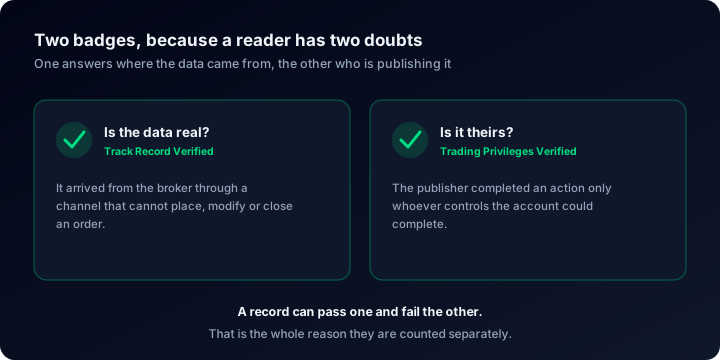
Track Record Verified means the numbers arrived from the broker through a channel that cannot place, modify or close an order. On cTrader that channel is the Open API authorisation described above, which is why the badge and the connection method are really one fact stated twice.
Trading Privileges Verified is a different test: the publisher performs an action on the account that only whoever controls it could perform. Data can be authentic and still be reposted by someone who never placed a single one of those orders. The account's real or demo status comes from the broker in both cases, not from a checkbox.
Across the whole site 65 accounts carry the first badge and 264 the second, which tells you something useful in itself: most published accounts have neither, and the badges are worth looking for precisely because they are not automatic. What third-party verification proves sets out the limits of each, and how to verify your own account covers the steps from your side.
What the page is worth after a few months
Connecting starts the clock; it does not wind it forward. The history already in the account is imported, and from then on the page grows at the speed the account trades. Three weeks of it proves that the connection works and very little else, which is the honest reading of how much history a track record needs before anyone should draw a conclusion from it.
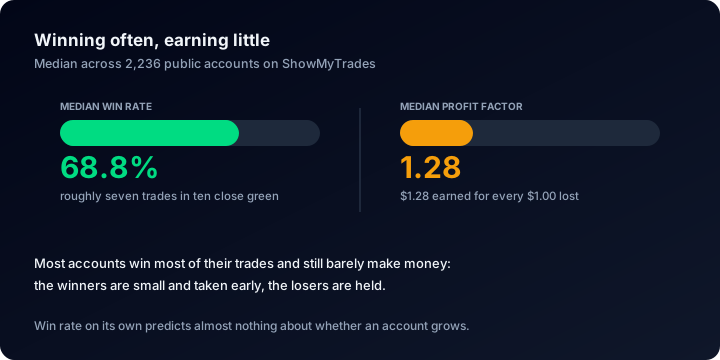
It is also why we publish the distribution rather than the highlights. Across the accounts published on ShowMyTrades, 15,436,464 trades synchronised between them, the median win rate is 68.8% and the median profit factor, net of costs, is 1.28: two numbers that sit together perfectly comfortably, and that should cure anybody permanently of reading a win rate as an edge. If that pairing looks contradictory, why win rate is not an edge takes it apart properly.
None of this requires you to publish anything. Connect the account, leave it private, and read what it says about you first. Publishing is a separate decision, taken per account, and it can be undone.
Questions people actually ask
Give your cTrader account an address
OAuth through the cTrader Open API, no password, revocable whenever you want, and a free page with nothing on it but your results. Connect it privately first and decide about publishing later.