Which one you need depends on who opens the link
Two products, two different jobs
Start with what they share, because it is more than people expect. Both read a MetaTrader account the same two ways: an Expert Advisor that reports from the terminal, or the read-only investor password. Neither can place, modify or close an order. Both give you a free public page for the account, and both rebuild the history from the broker rather than from anything you type in yourself.
After that they stop resembling each other. Myfxbook is a place. It has forums and a community that took years to gather. If what you want is to be seen by people who are already assembled somewhere, that assembly is the product, and nothing on our side replaces it.
ShowMyTrades is a document. It is the page you send after someone has asked to see your results: an EA buyer, an investor, a prop firm checking a claim, a broker evaluating a partnership. There is no audience waiting inside it and nothing to post in. What there is, is a page carrying your account and nothing else: no banners, no sponsored broker links, and no full-screen interstitial advertising somebody else's robot over your equity curve.
So the honest framing is not which platform is better. It is what you want the link to do. Of the 10,000+ accounts connected here, the ones their owners have published mostly exist to be sent to a particular person rather than browsed by strangers.
The comparison, row by row
| What you are comparing | ShowMyTrades | Myfxbook |
|---|---|---|
| Advertising around your statistics | None, anywhere, on any plan | Side banners, sponsored broker links and a full-screen interstitial that can promote competing Expert Advisors |
| Public profile and account pages | Free | Free |
| Embeddable widgets | Free, and they follow the host site's theme | — |
| What the paid plan is for | The Portfolio module only: several accounts aggregated into one view | — |
| MT4 and MT5 | Yes, two ways: our Expert Advisor with an API key you generate, or the read-only investor password | Yes, two ways: their Expert Advisor, or the read-only investor password |
| Turning a connection off | Delete the API key in your dashboard and the account stops reporting: nothing changes at your broker | Remove the connection on their side; with the investor password, change it in your terminal |
| cTrader | Yes, OAuth through the cTrader Open API | No |
| TradeLocker | Yes, broker credentials encrypted server-side | No |
| Can the connection trade for you? | No, the connection cannot write | No, the connection cannot write |
| Real or demo status | Pulled from the broker, not self-declared | — |
| Badge for where the data came from | Track Record Verified | — |
| Separate badge for who controls the account | Trading Privileges Verified, independent of the first | — |
| Terminal diagnostics: ping, packet retransmission, build, memory, auto trading, DLL imports | Yes, to the account owner only, never on the public page | — |
| Visibility states for an account | Private, published, or unlisted (link-only, out of search and out of Explore) | — |
| Hiding lot sizes, trade comments and stop levels | Each one separately, while the rest of the page stays public | — |
| Renaming your public link | Once every 30 days, with a permanent redirect so embedded widgets survive | — |
| Several accounts in one aggregated view | Yes, the Portfolio module | — |
| Community and forums | No | Yes, large and established |
| Economic calendar | Yes, free | Yes |
| An audience already on the platform | No, visitors arrive because you sent them | Yes |
A dash means we could not establish the answer from the outside, so we do not answer it on their behalf. We will describe what our own product does, and what any visitor can see on a public page. We will not characterise the inside of somebody else's product from a screenshot.
What four of those rows actually mean
Advertising
For a trader watching their own numbers in private, adverts are background noise. For a trader selling something, the reader they worked to convince is one click from a rival product, advertised on the page that was meant to close the sale. We carry none, on any plan, for anyone, which is a business decision rather than a feature, and it is why the paid plan covers only the Portfolio module.
cTrader and TradeLocker
These two rows are not a matter of degree. If your account lives on cTrader, or with a broker or prop firm on TradeLocker, the comparison ends there: neither Myfxbook nor FX Blue reads them. cTrader connects by OAuth, so no password changes hands at all, and TradeLocker uses the credentials your broker issued, encrypted server-side and never sent to the browser.
Two badges, two questions
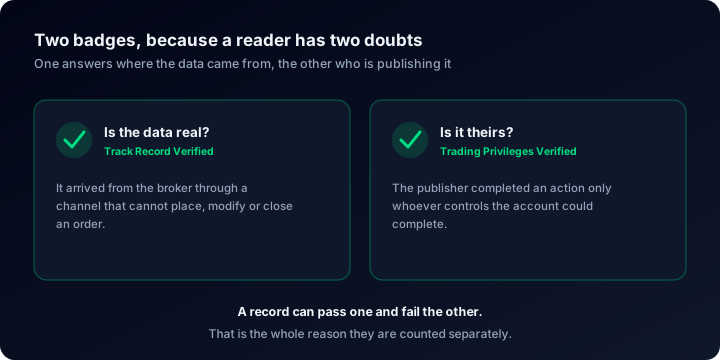
Track Record Verified answers "is this data real": it arrived from the broker through a channel that cannot place, modify or close an order. Trading Privileges Verified answers "is it this person's data": the publisher proved they control the account. Today 65 published accounts carry the first badge and 264 the second, because they are separate checks: a verified record and an unverified one are not the same document.
Diagnostics your reader never sees
Ping to the trade server, packet retransmission, terminal build, memory, whether auto trading is allowed, whether DLL imports are on. This is owner-only and deliberately absent from public pages: it is there for you, on the week a strategy stops matching its own backtest and the cause turns out to be the connection rather than the logic. Nobody evaluating you gets to see it.
Pick Myfxbook when the audience is the point
If you are building a following rather than answering one specific buyer, Myfxbook is where the people are. A community and forums that accumulated over years cannot be replicated with a feature list, and we have not tried: there is no forum here, no comment wall, no discussion thread under an account.
There is a structural reason behind that, worth stating once: every connection we hold is read-only, and there is no order routing anywhere in the product. Nothing here can move money, by design, which rules out a whole category of features and is the same property that makes the page safe to hand to a stranger.
One more concession, plainly. Discovery: our Explore page exists, but visitors mostly reach a ShowMyTrades page because its owner sent them there. If you are hoping the platform itself will bring you an audience, that expectation fits Myfxbook better than it fits us, and you should weight the last five rows accordingly.
Pick ShowMyTrades when the page has to survive scrutiny
Someone deciding whether to buy an Expert Advisor, allocate capital or approve a partnership is not browsing. They open one link and look for a reason to say no. What they find on a ShowMyTrades page is the account, the two badges, the real-or-demo flag pulled from the broker rather than declared by the owner, and nothing competing for their attention.
Behind that page sit 15,436,464 synchronised trades across 703 distinct broker servers, which matters for an unglamorous reason: costs and fills differ from one server to the next, and a record rebuilt from the broker's own data carries those differences instead of smoothing them away. It is also why the same strategy can look like two different strategies at two brokers, and why auditing what your broker actually charges you belongs in any honest reading of a track record.
The publishing controls belong in the same paragraph. Three visibility states (private, published, unlisted) let you send a link to a single prop firm without putting the account into search or into Explore, and lot sizes, comments and stop levels can each be hidden while the returns stay visible. Rename the page later and the old address redirects permanently, so a widget already embedded on somebody else's site keeps working. That is a small thing right up until it happens to you.
Or run both, which is what we would do
Because both connections are read-only, running both is neither risky nor awkward. On MetaTrader the investor password can be handed to both platforms; it cannot trade, so a second reader adds no exposure. On cTrader and TradeLocker the question never comes up, since only one of the two reads them at all.
- Keep the Myfxbook page for the community, the followers you already have there, and anything that depends on being inside a place people visit anyway.
- Connect the same account here and leave it alone: closed trades, balance and equity arrive from the broker, and there is no field anywhere for you to correct them.
- Send the ShowMyTrades link when the reader is a buyer, an investor or a prop firm, and the page needs to be about them rather than about whoever paid for the banner.
- Embed the widget on your own site or sales page, where it picks up the host theme and reads as part of the page around it.
Both links show the same trades, because they are reading the same account. What differs is the room you are showing them in.
Whichever page you send, teach the reader to read it
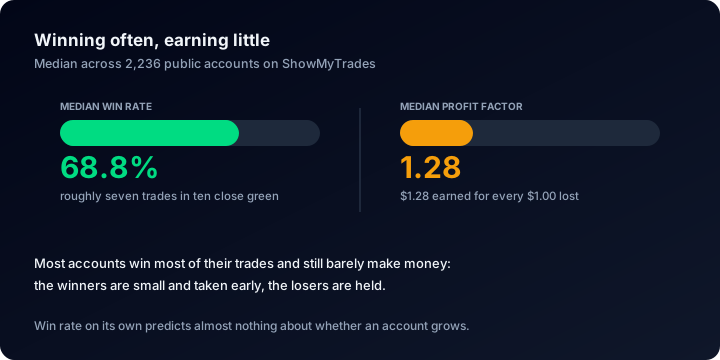
A comparison table is only worth something if the numbers underneath it are understood. Across the accounts published here the median win rate is 68.8% while the median profit factor is 1.28: those two figures sit together perfectly comfortably, which is exactly why a high win rate is not an edge on its own. The median deepest drawdown is 9.7%, and 38.2% of published accounts have been more than 20% under water at some point in their life.
If you are on the reading side of this, four guides do most of the work: reading an account dashboard , time-weighted return , maximum drawdown and how much history a record needs before it means anything at all. For buyers specifically there is spotting fake EA results and checking a performance claim .
On the publishing side, how to verify your account walks through both badges, third-party verification sets out what each one does and does not prove, and tracking performance properly covers the habits that make a record worth showing anyone. The calculators (position size, drawdown, risk of ruin) are free and need no account, and the calculator guide explains which one answers which question.
Questions people actually ask
You do not have to choose today
Connect the account here as well and compare the two pages with your own trades on both of them. It is free, it is read-only, and nothing you already have stops working.