Ten questions to ask before you trust a verified badge
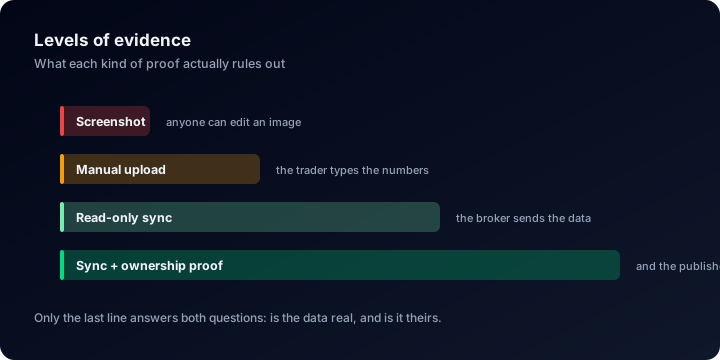
Verified is not one claim. It is several, wearing the same word
Those three cases give you completely different guarantees. The first tells you somebody looked at an image. The second tells you a number was true on a Tuesday five months ago. Only the third tells you anything about the account as it stands today. Yet all three can end up wearing the same word, and the reader is left to work out which one is in front of them.
So this is a checklist rather than a pitch. Ten criteria, each one a question a verification service either answers or does not, phrased so you can put them to any provider and get a yes or a no: the platform you use now, the one your prop firm recommends, or us. We score ourselves in the last column, and three of those scores are not a clean yes. Those three rows are what makes the other seven worth reading.
Two things to say before we score ourselves, because a checklist written by one of the products on it deserves the caveat. Read-only verification is not ours and not new. Myfxbook connects MetaTrader read-only with the investor password exactly as we do, and offers a free public profile as we do, with a community and forums on top that we have never had. FX Blue is a long-established tool with a deep feature set built up over many years. If what you need is a place to be discussed and followed, they answer that and this page does not.
The second point is about the word itself. Verification is an entry requirement, not a conclusion. It establishes that a number was not typed in by somebody with an incentive. It says nothing about whether the strategy that produced it survives the next change in market conditions. Keep those two questions apart and the checklist becomes far more useful than a badge on its own ever is.
The ten criteria
| Criterion | What a real yes looks like | ShowMyTrades |
|---|---|---|
| 1. A connection that cannot trade | The credential carrying the data has no permission to place, modify or close an order | Yes, on all four platforms |
| 2. Continuous sync, not a one-off import | Data keeps arriving after setup day, with nothing uploaded by hand | Yes, 15,436,464 trades kept in sync |
| 3. Real or demo taken from the broker | The word "real" is read from the account, not ticked in a form by the publisher | Yes, pulled from the broker |
| 4. Ownership proved separately from the data | Two checks, because "this data is genuine" and "this person traded it" are two claims | Yes, two separate badges |
| 5. Gaps in the record stay visible | When the feed stops, the page shows a gap instead of a smooth line | Partial. Visible on the curve, no dedicated uptime indicator yet |
| 6. Costs inside the numbers | Commission and swap sit inside profit factor and returns rather than beside them | Yes, net of costs |
| 7. No editing after the fact | Once a losing trade has arrived, nobody can rewrite it, the account owner included | Partial. Nothing can be edited; the trade list itself can be hidden |
| 8. Coverage of the platform you actually trade | Your platform is supported natively, not approximated with a manual export | MT4, MT5, cTrader, TradeLocker |
| 9. A public page you can hand to someone | A link that opens without an account, plus an embed for your own site | Yes, free, no advertising |
| 10. Honesty about what it cannot prove | The service says where verification stops instead of implying it stops nowhere | Partial. Written out below, not on the account page itself |
Rows five, seven and ten are the ones to read twice. The rest are mechanical and answerable with a yes or a no. Those three are where a provider has to concede something, and a provider who concedes nothing has usually not been asked the right question yet.
The four rows that carry most of the weight
A channel with no write access
MetaTrader uses the investor password, which reads balance, equity and every trade and cannot send an order. cTrader uses OAuth through the official Open API, so no password changes hands at all and you can revoke access from cTrader itself. TradeLocker uses the credentials your broker issued, encrypted server-side. In each case the inability to trade is a property of the connection, not a sentence in a terms page.
Sync, not import
An imported statement is a photograph. It was accurate the moment it was taken, it has been drifting ever since, and whoever took it chose the moment. A synced account has no such moment: the record extends itself whether the month went well or badly. Across the 10,000+ accounts connected here, that is the difference between a track record and a souvenir.
Real or demo, decided by the broker
A demo account produces a perfectly genuine equity curve. It simply does not involve money. If the real-or-demo flag is a field the publisher fills in, it is the easiest thing on the entire page to get wrong, deliberately or by accident. Ours arrives from the broker with the rest of the account data, which is the only place it can come from and still mean something.
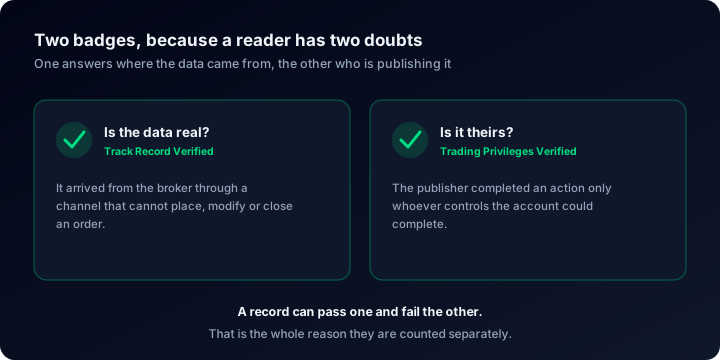
Two badges, two questions
Track Record Verified answers "is this data genuine". Trading Privileges Verified answers "did this person trade it", by requiring an action only somebody in control of the account could perform. A real, unedited track record can still be reposted by a stranger, so folding both into one badge quietly loses the more interesting half. What third-party verification actually proves goes through the mechanics of each.
Where our own answers are not a clean yes
Criterion five, gaps. If a MetaTrader terminal stops feeding us, the missing days are visible in the equity curve and the trade timeline, because we do not invent points to bridge them. What we do not yet have is an uptime indicator on the public page that says, in as many words, "this account was offline between these dates". The account owner does get terminal diagnostics (ping, packet retransmission, terminal build, memory, whether auto trading is allowed, DLL imports) but that panel is deliberately private and is not part of what a visitor sees. Today a reader has to notice a gap rather than be told about one. That is a partial yes and we score it as one.
Criterion seven, editing. No trade can be altered or deleted once it has arrived: there is no edit control anywhere in the product, for the owner or for us, and every figure on the page is computed from the synced history. What the owner does control is what a visitor sees. Open trades, closed trades, lot sizes, comments, stop levels and whole panels can each be switched off for the public page and the widgets. Nothing is rewritten by that, and the equity curve and the statistics keep counting every trade either way, but a reader should know a hidden trade table is possible rather than assume the absence of one means there was nothing to show.
Criterion ten, and how common verification actually is here. Verification is the exception on this site rather than the norm, and the limits above live in guides like this one instead of being printed on the account page beside the badge. Of the 10,000+ accounts published here, 65 carry Track Record Verified and 264 carry Trading Privileges Verified. We could have written a page implying every account here is checked; the real counts are more useful to you than that implication would be. Verified versus unverified track records sets out what an unverified page is still good for, which is more than nothing and less than most people assume.
And the thing we do not build at all. There is no community and no forum here. That is a difference in scope rather than a scoring question, and no amount of checklist scoring changes it: if that is what you came for, this is not the product.
What no verification service can prove
A verified account cannot prove the position sizes meant anything to the person trading them. It cannot prove the same trader is not running nine other accounts, eight of which are never published: survivorship is invisible from inside a single page, and that blind spot is exactly what most fabricated EA results are built on. And it cannot tell you whether a good year was skill or a market that happened to suit the strategy.
Which is why the numbers on a verified page still have to be read properly. The median win rate across accounts here is 68.8%, which sounds like a finding until you notice how little it settles: win rate is not an edge . Nor is a clean-looking curve a promise of a shallow one, since 38.2% of the accounts here have been more than 20% underwater at some point and 17.6% more than 50%. Verification hands you trustworthy inputs. Reading drawdown , time-weighted return and what the broker took is still your side of the work.
Length matters as much as authenticity, too. Six verified weeks are six weeks of evidence, however clean the pipeline behind them, and how much history a track record needs covers where the useful thresholds sit. If a claim arrives with no page attached at all, verifying trading performance claims is the version of this checklist for screenshots.
Running the checklist in ten minutes
- Open a public account page the way a stranger would. Log out first. Whatever a visitor cannot see does not count as verification, however good the owner's private dashboard is.
- Ask what the connection is allowed to do. Which credential carries the data, and can it send an order. If the answer is vague, treat the badge as decoration.
- Note the last update, then come back tomorrow. A synced account has moved. An import has not.
- Check the real-or-demo flag and where it came from. Self-declared and broker-sourced are different claims, and pages rarely volunteer which one you are looking at.
- Scan the equity curve for flat stretches. Then ask whether the page tells you why they are there, or leaves you to assume.
To run steps one, three and five against live pages rather than in the abstract, Explore is full of real published accounts, and reading a trading account dashboard walks through the panels one at a time. For your own account, how to verify your account is the short version, and the calculators are there for the moment you want to sanity-check a number before believing it.
Questions people actually ask
Run the checklist against your own account
Connect read-only, let the history load, and see how many of the ten rows your track record can answer. Public pages, badges and widgets are free, and nothing we connect to can place a trade.