The proof on your sales page should look like part of the page
First, what FX Blue is
That is not a courtesy line before the pitch. FX Blue is long established and the range of what it calculates is deep. If it already answers the questions you ask of it, the honest advice is to keep it, and nothing further down this page is an argument for switching it off.
This page is for a narrower situation. It is for the trader who has stopped using an analytics tool privately and started using it publicly: sending the link to a buyer, an investor, a prop firm or a subscriber, or embedding the results on a site they own. At that point two things begin to matter that never mattered while the tool was just for you: what the page looks like to a stranger who has never heard of either of us, and what happens when you paste a widget into your own layout.
Our own connection reads the account and has no authority to send an order to it, so nothing here asks you to give anything up. The differences below are about presentation, about which platforms are covered, and about what the page states as verified.
What the two pages do differently
| What you are comparing | ShowMyTrades | FX Blue |
|---|---|---|
| Embeddable widget styling | Follows the theme of the site it sits in | A white 2010-era block |
| Interface | Built for current browsers, dark and light | Dated |
| Adverts and sponsor banners around your numbers | None, on any plan, for anyone | Sponsor banners for brokers on the pages |
| MT4 and MT5 | Yes, read-only investor password | Yes |
| cTrader | Yes, OAuth on the cTrader Open API | No |
| TradeLocker | Yes, credentials encrypted server-side | No |
| Verification badges | Two: Track Record Verified, Trading Privileges Verified | — |
| Real or demo status | Pulled from the broker, not self-declared | — |
| Visibility control | Private, published or unlisted; lots, comments and stops hidden separately | — |
| Renaming your public link | Once every 30 days, old address redirects permanently | — |
| Terminal diagnostics (ping, retransmission, DLL imports) | Yes, to the account owner only | — |
| Breadth of the toolset | Narrow on purpose: track records and the tools to read them | Deep, built up over many years |
| Community and forums | No | — |
| Economic calendar | Yes, free | — |
A dash means we have not verified it and will not guess. Everything in the FX Blue column that is not a dash comes from looking at their pages ourselves; the rest is theirs to describe, not ours.
Then read the last row properly, because it is the one that should send some people away. Their feature set is deeper than ours and has been built up over far longer, and we have no community and no forum. What we build is the page a track record lives on, and the widgets that carry it somewhere else.
Why the widget is the row that matters
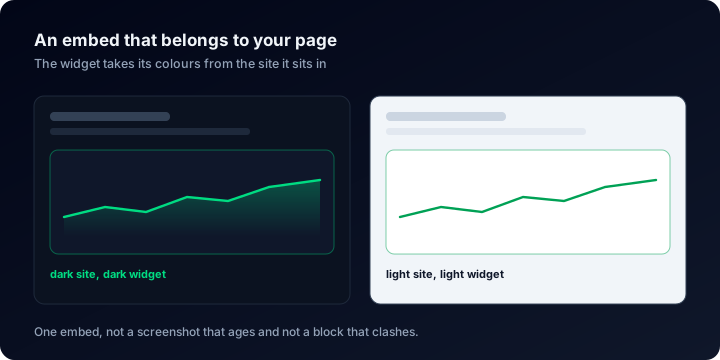
Think about where these things end up. A vendor's sales page. A signal seller's landing page. A forum signature. A prop firm application. Most of those pages are dark now, and a white rectangle dropped into a dark layout reads as something bolted on from elsewhere rather than as part of the page. The one element that was meant to settle a reader's doubt becomes the one their eye slides straight past.
Our live embeds take the theme of the site they sit in. Dark page, dark widget; light page, light widget; the same corners and weights as the layout around them. Because the embed renders live instead of sitting there as a screenshot, the equity curve and the statistics move as the account trades, and nobody has to remember to refresh anything after a good week or quietly forget to after a bad one. For places a script cannot go (a forum signature, an email), the same data is available as a generated PNG or SVG in colours you pick.
The other half of that promise is that the embed survives you. A public link can be renamed at most once every 30 days, and the old address keeps working through a permanent redirect, so a widget pasted on somebody else's site three months ago does not quietly turn into an empty box the day you change your handle. To see how the pages and their widgets actually render before signing up for anything, Explore lists accounts that are published right now.
The same principle governs the page itself. There is no advertising anywhere on ShowMyTrades, on any plan, for anyone: no banners beside the equity curve, no sponsored links under the statistics, nothing standing between a reader and the numbers. Public profiles, account pages and widgets are free; the paid plan exists for the Portfolio module, which merges several accounts into one aggregated view.
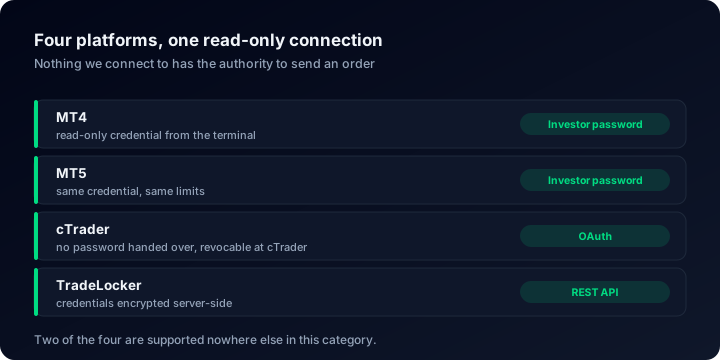
Four platforms behind the same page
MT4 and MT5
Connected with the investor password, which exposes balance, equity and the full trade history and carries no authority to place, modify or close an order. Connecting the account changes nothing about how it trades.
cTrader
Authorised over OAuth on the cTrader Open API, so no password is typed here at all. The approval happens on cTrader's side and can be withdrawn there at any point, without going through us.
TradeLocker
The white-label platform behind a growing number of brokers and prop firms, and one of the two here that neither FX Blue nor Myfxbook covers. The credentials your broker issued are encrypted server-side and never travel to the browser.
Terminal diagnostics
A panel that is not about the trades at all: ping to the trade server, packet retransmission, terminal build, memory, whether auto trading is permitted and whether DLL imports are. It is served only to the account owner and never renders on a public page.
Two badges, because a reader has two doubts
Track Record Verified settles the first. The figures arrived from the broker along a channel with no power to place, modify or close an order, so there was no moment at which anyone could have typed them, uploaded them or tidied them up.
Trading Privileges Verified settles the second. Whoever publishes the page did something only the account's owner could do. Without it, a track record can be entirely genuine and still be sitting on the wrong person's page.
Both badges sit in the header, beside a Real or Demo label taken from the broker rather than from a box the owner ticked. Neither badge is given away for signing up: of 10,000+ connected accounts, 65 carry Track Record Verified and 264 carry Trading Privileges Verified. For the mechanics, what third-party verification actually proves sets out what each badge does and does not establish, and how to verify your account walks through earning them.
The numbers, and how to read them
Across the connected accounts on 703 distinct broker servers, the median win rate on ShowMyTrades is 68.8%, while the median profit factor, net of costs, is 1.28. Those two figures belong side by side: a high win rate is one of the easiest numbers in trading to produce and one of the least informative, which is why it gets a guide here rather than a headline.
Reading a page
Reading a trading account dashboard walks through every block on a public account page, in the order a sceptical reader should take them.
Return and risk
Time-weighted return takes deposits and withdrawals out of the picture; maximum drawdown says what holding the account felt like.
What proves nothing
Why win rate is not an edge and spotting fake EA results cover the numbers that look strongest and mean least.
How long is long enough
How much history a track record needs answers the question every serious buyer asks straight after the first chart.
What the broker takes
The broker cost audit separates spread, commission and swap from the strategy result, which matters most on high-frequency accounts.
Before you size a trade
The free calculators cover position size, margin, drawdown and risk of ruin, and this guide explains which one to reach for.
From nothing to an embeddable page
- Point us at the account. The investor password on MetaTrader, an OAuth approval on cTrader, the credentials your broker issued on TradeLocker.
- Wait while the history arrives. Closed trades, balance and equity come across on their own; there is no import file and nothing to type.
- Decide how visible it is. Private, published, or unlisted (reachable by anyone holding the link, but out of search and out of Explore). Lot sizes, comments and stop levels each have their own switch.
- Copy the embed. A custom slug for the page itself, and a widget for your own site that arrives in your colours instead of fighting them.
Whatever you already have set up can stay exactly where it is while you do this: our connection only ever reads, so nothing in the process asks you to choose one page over another. If you want the wider view first, verified versus unverified track records and tracking trading performance are the two most people read before connecting anything, and verifying performance claims is the one to send to whoever is checking you out.
What people ask before they paste the embed
Put your track record somewhere it looks like it belongs
Free public pages, free widgets that follow your site's theme, no advertising anywhere, and four platforms, two of which neither FX Blue nor Myfxbook covers. Connect an account and see how it renders on a page of your own.