Embed Your Verified Results Anywhere: The Widget Guide 2026

You have a public account page. Then somebody asks for proof somewhere else: on your own site, in a forum thread, on the sales page for the EA you rent out.
So you paste a screenshot, and the conversation stops there, because a screenshot is a picture of numbers and anyone can make a picture of numbers.
The widget system closes that gap: it puts your live, broker-synced page inside somebody else's page. This guide covers the three formats, the seven interactive views and the eleven image types, where each belongs, what stays hidden, and what happens to an embed you pasted a year ago and forgot.
🖼️ What a Live Widget Proves That an Image Cannot
An embedded widget is not a copy of your data. It is a request to ShowMyTrades made by the visitor's browser as they load the page, down the same data path as the account page itself. Nothing sits in the middle to be edited.
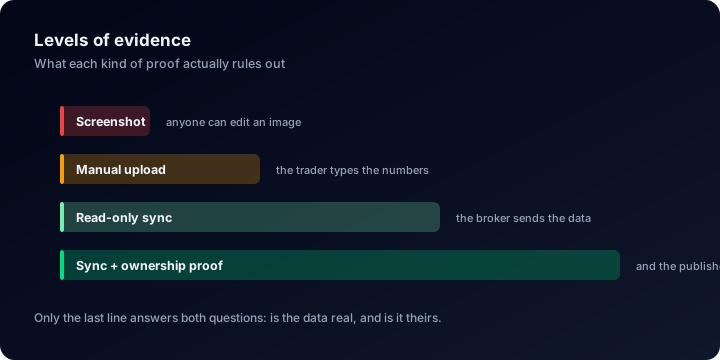
A widget moves your proof up two rungs from the screenshot it replaces.
Public account pages on ShowMyTrades have been visited 94,710 times, and that traffic behaves the way sceptical traffic behaves: people arrive from a claim made somewhere else and go looking for the number the claim left out.
Every widget links back to /account/{your-slug}. Six of the seven do it through a "Verified by ShowMyTrades.com" footer; Stats Inline, which has to stay 80 pixels tall, uses a small ↗ instead. That link is the point. The widget shows the flattering part; the link exposes the rest (drawdown, red months, costs), and a reader who clicks through and is still convinced is actually convinced.
Two badges make that click worth more. Across ShowMyTrades only 65 accounts carry Track Record Verified and 264 carry Trading Privileges Verified, out of 10,000+ published pages. The Complete Dashboard renders both inside the frame (green when earned, grey with a warning mark when not), so get them first. A widget on an unverified account is a nicer-looking screenshot.
🧩 Three Formats, and What Each One Is For
The builder starts with one decision: how the widget travels. The rest is styling.
| Format | What it is | How it updates | Interactive | Where it belongs |
|---|---|---|---|---|
| Interactive iframe | The live widget page rendered inside a frame on your site | Every page load | Yes: hover tooltips, chart switching, table/chart toggles | Your website, blog, landing page |
| Dynamic Image | A PNG or SVG generated server-side, served through /api/widget-image/… | Regenerated when your trading data changes; browsers cache it 15 minutes | No | Forums, Reddit, email signatures, anywhere scripts are stripped |
| Static Image | A file you download once | Never | No | Slide decks, PDFs, offline use |
The rule of thumb: if the page allows an <iframe>, use the iframe. If it only allows <img> or BBCode, use the dynamic image. If it will be printed or shown offline, download the static one, frozen the moment you save it.
📐 The Seven Interactive Views
The iframe format offers seven widget types. Picking one prefills a width and height that fit its content; you can then override the width in pixels (200–2000) or percent.
| Widget | Prefilled size | What is inside |
|---|---|---|
| Stats Card | 400×212 | Gain, Drawdown, Balance, Equity |
| Stats Inline | 750×80 | The same four metrics in a horizontal strip, built to stack as table rows |
| Equity Curve | 1000×400 | The full chart module: Growth, Balance, Profit, Growth by Trade, Drawdown |
| Monthly Returns | 1040×400 | Monthly table with percent/money and table/chart toggles |
| Currency Pair Stats | 900×400 | Per-symbol longs, shorts and totals, plus distribution pies |
| Trade History Table | 1100×520 | The Trade History & Balance Progression panel: paginated closed trades and open positions |
| Complete Dashboard | 1500×900 | Account header with verification badges, stats panel, and the whole chart module |
Two of these behave differently under the hood. Stats Card and Stats Inline read balance, equity, gain and drawdown straight from stored account metadata instead of recomputing anything, so they load fast and keep a fixed height, the right choice when you want several accounts on one page.
Complete Dashboard is the only widget that renders the account header, so it is the only one showing the Real Account / Demo Account label and both verification badges inside the frame. Everything the other six display is explained metric by metric in how to read a trading account dashboard.
🎨 Dynamic Images: Eleven Types, Three Themes, Your Colours
The image path is separate, and for anything outside your own website it is usually the better one. Eleven types are generated per account: stats (310×170), stats-inline (750×80), growth-daily (1000×450), growth-trade (1000×455), balance (1000×450), profit (1000×455), drawdown (1000×455), growth-mini (400×200), summary (500×290), plus monthly (1066 wide) and currency-pair (1196 wide), both tables at dynamic height.
Each comes in light, dark and transparent, as PNG or SVG. Growth by Trade is the one exception: the builder forces it to PNG.
The SVG version is where the customisation lives. Background, text, axis labels, grid, main line, secondary line and the positive/negative colours each take a hex value; which fields appear depends on the type, since a table has no axis and a drawdown chart has no second line. The reveal animation can be switched off, and the main line, secondary line or area gradient can be hidden. The scale slider stops at 100% for PNG and 200% for SVG.
The transparent theme is the one people forget. Over a coloured section on a sales page, a dark card looks like a mistake; a transparent chart looks designed.
🛠️ Building the Embed Inside ShowMyTrades
The builder is the same component in two places. Logged in it lives at Dashboard → Widgets; logged out, /widgets runs the same tool restricted to public accounts.
The fastest route skips the menu entirely: on any public account page, the </> "Embed widget" button opens the builder with that account already selected and the Equity Curve chosen.
- Select Account. The Your Accounts tab lists your published accounts, your published portfolios (marked with 📁), and accounts you follow. The Any Public Account tab searches the platform by account name or ID.
- Choose Widget Format. Interactive iframe, Dynamic Image, or Static Image: the three cards at the top.
- Customize Widget. Widget type, width in pixels or percent, theme (Auto / Light / Dark), and an optional custom background colour with an alpha channel.
- Tune the charts. Equity Curve and Complete Dashboard expose the five chart groups (Growth, Balance, Profit, Growth by Trade, Drawdown), each with its own colour pickers and line, area and series switches. Only the values you changed are encoded into the URL, so the code stays short.
- Live Preview. The panel renders the real widget in a real iframe at the size you picked.
- Copy the code. The iframe Code card holds the HTML with a copy button. The Dynamic Image path gives HTML, Markdown and BBCode, each already wrapped in a link back to your account page. The Download button lives on the Static Image path, not this one.
Keep the auto-resize script
For every variable-height widget (everything except Stats Card and Stats Inline), the copied code includes a few lines of JavaScript. The widget measures its own rendered height, posts it to the parent page, and re-posts it whenever the content changes: flipping the Monthly widget from table to chart resizes the frame with it.
Delete the script and the widget still renders, but inside a fixed box with a scrollbar in it. Keep it, and set width to 100% if your layout is responsive.
Things that would otherwise break, and do not
Renaming your account. Retired slugs live in a redirect table that both the iframe endpoint and the image proxy consult, so an embed pasted on somebody else's site keeps rendering after you rename.
Strict host sites. Widget pages are served with frame-ancestors * and open CORS, so any domain can host them. They are also marked noindex and skipped by the prerenderer, so your embed never competes with your own account page in search results.
Traffic. Widget endpoints allow 50 requests per second and 300 per minute per IP: a page carrying a dozen widgets is fine, a scraper is not.
The one thing that does break an embed is setting the account back to private: widgets serve published accounts only, and anything else shows "Account not found or not public" inside the frame. Link-only (unlisted) accounts keep working: they are published, only hidden from discovery.
📍 Where the Widget Actually Belongs
- Your own site or blog. Interactive iframe, Equity Curve at 100% width. Give a dedicated "track record" page the Complete Dashboard instead.
- A sales page for an EA or signal service. Equity Curve or Complete Dashboard above the price, Monthly Returns below it. Why the live version beats a pretty image: 38.2% of public accounts on ShowMyTrades have been more than 20% underwater, and 17.6% more than 50%. A reader who knows that distribution assumes you are hiding something until they can click through and check. Let them.
- Forum signature, Reddit, Discord. Dynamic Image. Stats Inline at 750×80 fits a signature; Growth Mini at 400×200 works inside a post. Use the BBCode snippet where BBCode is the language.
- Email signatures and newsletters. Dynamic Image as PNG: mail clients strip scripts and mangle animated SVG.
- Slide decks and PDFs. Static Image download, or the chart download button on your account page: PNG at 3× pixel ratio, watermarked with the account name.
- A page comparing several accounts. Stats Inline, stacked: what its 750×80 strip was built for.
🔒 What Stays Private, and What You Should Not Publish
The seven Privacy Options in your account settings apply inside widgets, not only on the public page: Open Trades, Closed Trades, Account Number, Lots, Trade Comments, Stop Loss / Take Profit, Trade Notes. Turn Lots off and the Trade History widget hides that column too.
What to think twice about before it goes on a third-party site:
- Live open positions, if you sell signals. The Trade History widget reloads your open trades on every visit: a free feed of your entries. Turn off Open Trades, or at least Stop Loss / Take Profit so your stops are not public.
- Trade comments. Many EAs write their own name, version and settings into the comment field. That column is a specification sheet for anyone who wants to copy you.
- The account number. Harmless on its own, but it is one switch away from hidden and it removes a piece of social-engineering material aimed at your broker's support desk.
- Credentials, ever. MT4 and MT5 connect through a read-only investor password, cTrader through OAuth, TradeLocker through encrypted stored credentials. No widget renders any of it, and none of it belongs in a caption either.
- Anything you would not publish at all. Anybody can embed any public account, yours included, anywhere. If a number is not for the world, the account belongs on private or link-only, not behind a smaller widget.
⚠️ Five Mistakes That Ruin an Embed
- Deleting the auto-resize script. You get a permanent inner scrollbar on every widget except the two Stats ones. The most common broken embed by far.
- Hard-coding a pixel width on a responsive site. Switch the width unit to percent and use 100%: a 1500px frame in a 390px viewport does not adapt.
- Using an iframe where scripts never run. Forums, Reddit, marketplaces and email strip them and leave an empty box. That is what the Dynamic Image format is for.
- Screenshotting the widget. Someone builds a live embed, then saves it as a PNG for convenience, converting proof back into a picture.
- Embedding a three-month account as evidence. A widget faithfully displays a sample too small to mean anything. The median public account here has 171 closed trades; below that you are showing variance and calling it edge. See verifying trading performance claims for what an experienced reader checks.
❓ FAQ
Do I need to be logged in to build a widget?
No. /widgets runs the full builder for any public account without an account of your own. The dashboard version adds your own accounts, your portfolios and the accounts you follow to the selector.
How fresh is the data inside a widget? The iframe refetches on every page load, down the same data path the account page uses: no cached copy of your numbers sits in the embed. The dynamic image is regenerated when your trading data changes, and the browser holds it for 15 minutes.
Can I embed an account that is not mine? Yes, if it is public. Use the Any Public Account tab and search by name or ID. The footer still links to the owner's page; you are quoting a record, not claiming it.
Can I embed a portfolio instead of a single account? Yes. Published portfolios appear in the selector marked with 📁 and go through the same widget types as a single account.
Can I match the widget to my site's colours? Yes, on both paths: see the two sections above. One warning: set the theme explicitly if your site commits to light or dark, because Auto follows the visitor's system setting, not your design.
Does an embedded widget compete with my account page on Google?
No. Widget pages are served noindex and are excluded from prerendering, so they never appear as a duplicate of your public page.
🔗 Related Guides
- How to show your MT4 or MT5 results on your website and your cTrader results: from connecting the account to the live chart
- WordPress and Wix, Webflow, Squarespace, Shopify: where the snippet goes in each builder
- Live EA results on your sales page, a track record page and several accounts on one page: what to build with the widgets
- Forum signatures, email and chat: the image formats, place by place
- How to read a trading account dashboard: every metric your widget displays, explained
- Verified vs unverified track records: why the connection behind the widget is the part that matters
- How to verify your trading account: earn both badges before you embed anything
- The complete guide to tracking your trading performance: what to monitor once the record is public
Every account on Explore is embeddable, and the widget you build from one shows exactly what its owner's own embed shows: try it before you build yours. Then connect your account free, publish the page, and paste your first widget.
Custom Analysis: Slice Your Trade History Until It Tells the Truth {YEAR}
Filter your trade history by symbol, magic number, hour or duration, recalculate every statistic on the subset, and save the view as a reusable preset.
Your Public Trading Profile: Slugs, Redirects and What Visitors See {YEAR}
Private, published or unlisted: what your public trading page exposes, what it never shows, and how to change your URL without breaking shared links or widgets.